Level 1 of 10 · Beginner
Spotting phishing, and what to do after a click
For everyone with an inbox: an email from ‘HR’ about your salary, an invoice nobody expected, and what to do if you clicked anyway.
Not started · 5 questions
Awareness · sample trainings
Four short trainings, each at a different level, with questions from the Awareness catalogue. Choose an answer and see straight away why it is right or wrong. Nothing is stored or sent.
Awareness has ten levels, from Level 1 for beginners to Level 10 for specialists. The auto-trainer picks the right level for each employee. Here are four of them.
IB Awareness · four of the ten levels
Level 1 of 10 · Beginner
For everyone with an inbox: an email from ‘HR’ about your salary, an invoice nobody expected, and what to do if you clicked anyway.
Not started · 5 questions
Level 3 of 10 · Beginner
For anyone who makes or prepares payments: the director in a hurry, the supplier with a new bank account and gift cards for the team.
Not started · 5 questions
Level 5 of 10 · Intermediate
Twenty login requests in three minutes, an email without a single typo and a ‘lawyer’ asking for a secret payment.
Not started · 5 questions
Level 8 of 10 · Expert
For IT and management: how much audio it takes to clone a voice, a video meeting with a fake CFO, and why MFA alone is not enough.
Not started · 5 questions
5 questions · from the Awareness question bank
For everyone with an inbox: an email from ‘HR’ about your salary, an invoice nobody expected, and what to do if you clicked anyway.
Level 1 of 10 · Beginner
Question 1 of 5
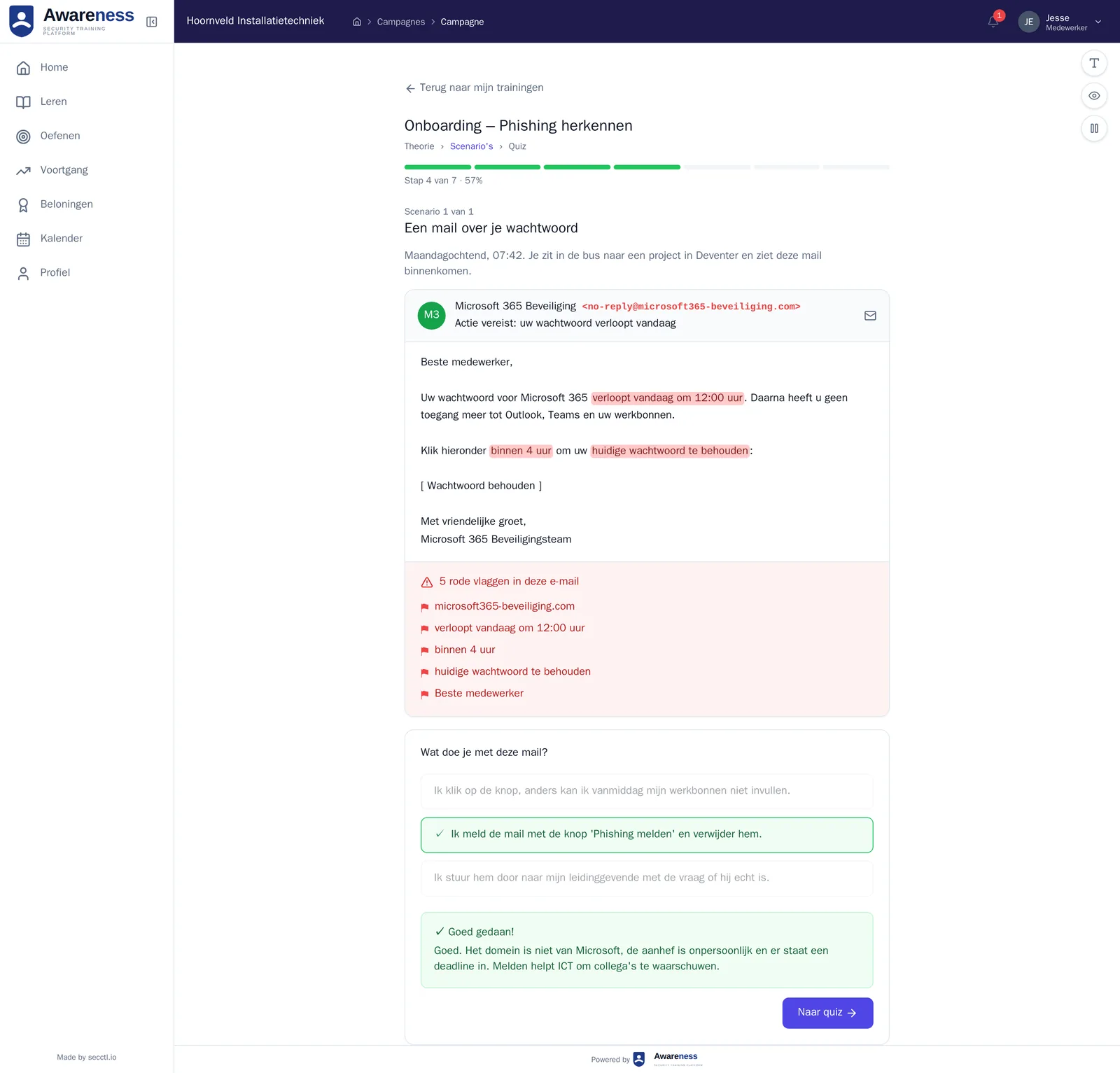
You receive the email below on a Tuesday morning. You work for a company called 'Meridian Group'.
Dear employee, Due to an update to our payroll system, we ask you to confirm your bank details. Without confirmation, your salary for this month cannot be processed. Please click below to enter your details: [Confirm details] Kind regards, HR Department Meridian Group
You click the link to confirm your bank details so your salary is not delayed.
Wrong. The link leads to a fake site that steals your bank details. The salary threat is deliberately chosen to make you act without thinking. Always check the domain before clicking any link.
You call HR using the internal number from the company directory to ask whether this request is genuine.
Correct. The domain does not match and HR never requests bank details via a link. By looking up the right number yourself and calling, you verify authenticity without taking any risk.
You reply to the email address in the message asking for confirmation.
Wrong. Replying sends your response directly to the attacker. It also confirms that your address is active. Never respond to a suspicious message through the same channel.
You delete the email and assume HR will resend it if it is really important.
Wrong. Deleting without reporting does not help your colleagues and leaves IT unaware of an active attack. Always report suspicious messages to the IT department first.
3 red flags in this message
Question 2 of 5
You work in the finance department and receive this email midway through the day.
Dear Sir/Madam, Please find attached invoice #2024-8812 for office supplies delivered (see attachment). The invoice amount of €3,247.50 must be paid no later than 30 May to the account number stated in the attachment. For questions, please contact us via this email address. Kind regards, Administration OfficeEase Ltd
You open the attachment to verify the invoice number and account number.
Wrong. The attachment may contain malware. Never open attachments from unknown or suspicious senders, even to 'check' them.
You pay the invoice; an amount of just over three thousand euros is normal for office supplies.
Wrong. The fact that the amount sounds 'normal' is not verification. Never pay on the basis of an unverified invoice from an unknown party.
You delete the email immediately; your organisation does not work with this company anyway.
Wrong. Deleting without reporting does not help your colleagues. Report the email to IT so others are warned.
You do not open the attachment, report the email to IT and verify via known internal channels whether this invoice was expected.
Correct. Unexpected invoices from unknown parties with attachments are a classic phishing method. Reporting and verifying internally is the right approach.
3 red flags in this message
Question 3 of 5
You type the link text manually into the browser address bar
You hover your mouse over the link and look at the address shown in the bottom-left of the browser
You search the sender's name in Google
You inspect the source code of the email
Hovering over a link reveals the real URL in the bottom-left of the browser without any risk. Viewing the source code is more technical and unnecessary for this check. Searching by name in Google gives no certainty about the specific link in the message.
Question 4 of 5
A recovery code stored at home in a locked safe
A work password on a note in a desk drawer
A PIN written on the back of your access card
A password on a sticky note attached to your screen
A recovery code or emergency password may be stored at home in a locked safe or drawer. At the workplace, paper notes with passwords are never acceptable — not even in closed drawers.
Question 5 of 5
Yes, even without entering details, visiting a malicious page can carry risks
No, reporting is only necessary if you actually entered credentials
No, only if you notice visible damage to your device
Yes, but only at the end of the working day to avoid unnecessary disruption
A malicious page may contain tracking or download code that activates upon visiting, without you entering anything. Always report, even if no credentials were submitted.
Next: Level 3, harder.
Go to Level 3This is how Awareness trains your staff automatically, each at their own level.
5 questions · from the Awareness question bank
For anyone who makes or prepares payments: the director in a hurry, the supplier with a new bank account and gift cards for the team.
Level 3 of 10 · Beginner
Question 1 of 5
You work in the finance administration. On a Friday afternoon you receive this email.
Hello, I'm in the middle of finalising a confidential acquisition. A down payment of 38,500 euros must go to our new partner today. I cannot discuss this with anyone else before the deal is closed, so will you handle it discreetly? Account number to follow in my next email. Reply only to me. Regards, Hans Verburg
You make the transfer as soon as the account number arrives; the director is asking urgently, after all.
Wrong. This is a classic CEO fraud. The sender domain is wrong and the imposed secrecy is designed to take away your ability to check.
You call Hans Verburg on the internal phone number you know yourself and ask whether this request really comes from him.
Correct. You always confirm a payment request by email via an independent second channel. A genuine director understands that check.
You reply to the email asking for more details about the acquisition.
Wrong. Your reply reaches the attacker, who will give you a reassuring story back. Verify outside the email.
You wait for the second email with the account number and only then judge whether it is genuine.
Wrong. You do not judge an account number 'by feeling'. The request itself is already suspicious and must be verified first.
3 red flags in this message
Question 2 of 5
A supplier you have worked with for years sends a reminder for an outstanding invoice. The email comes from an ongoing conversation you recognise.
Dear Sir/Madam, We would like to point out that invoice 2026-0488 is still outstanding. Please note: our account number has changed this month due to a change of bank. Kindly make the payment to the new IBAN stated at the bottom of this email. Kind regards, Accounts Tervoort Technology
You pay to the new IBAN; the email clearly comes from your existing conversation.
Wrong. Even a genuine-looking account can be taken over. You always verify a changed account number, regardless of how familiar the email seems.
You call the supplier via a phone number from the original contract and confirm whether the bank change is genuine.
Correct. You check a change of payment details via an independent, known channel — never via the contact details from the email itself.
You pay a small part first as a test and the rest after a confirmation of receipt.
Wrong. A partial payment also goes to the fraudster. The problem is the unverified account number, not the amount.
You update the account number in the system in advance and pay when the invoice falls due.
Wrong. Updating the account number based on an unconfirmed email is exactly what the fraud relies on.
3 red flags in this message
Question 3 of 5
You are assistant to the department manager. You receive this short message.
Hi, I'm in a meeting so I can't call. I want to surprise the team with a gift. Could you buy 6 gift cards of 100 euros and send me the codes on the back? I'll settle it with the department later. Preferably within the hour, then I can hand them out this afternoon. Thanks!
You walk past Annet's office or call her on her known internal number to check whether this request really comes from her.
Correct. You verify an unusual request from a deviating address via a channel you know yourself, before buying or forwarding anything.
You buy the gift cards and send the codes; your manager wants to surprise the team.
Wrong. The private address, the gift cards and the time pressure together form a classic BEC trick. Forwarded codes can be cashed immediately.
You buy one card as a test first and wait for confirmation for the rest.
Wrong. Even one card is a loss and confirms to the attacker that you are cooperating. Verify the sender's identity first.
You reply to the email asking whether it is really Annet.
Wrong. An attacker simply confirms that they are Annet. Verification must happen outside this email address.
3 red flags in this message
Question 4 of 5
Because the emails are sent encrypted
Because the message consists of pure text, with no malicious link or attachment
Because filters only check internal email
Because BEC emails are always sent outside office hours
BEC attacks contain no virus, link or file — only convincing text. As a result there is little for a technical filter to detect, and the recipient must recognise the request themselves.
Question 5 of 5
You entered your username and password on a page that looked like your email provider's login screen. Afterwards you noticed that the address in the browser bar differed from the normal domain. You realise you were on a phishing site.
You wait until the end of the working day and report it to IT then to avoid disrupting your work.
Wrong. Every minute of delay increases the chance the attacker has already accessed your account. Report it immediately — work disruption is acceptable when a security incident is involved.
You change your password immediately from a different, safe device and report the incident to your IT department.
Correct. Changing the password quickly from a safe device limits the time the attacker has access. Then report to IT immediately so they can prevent further damage and investigate the incident.
You try to log in to your account yourself to check whether the attacker is already active.
Wrong. Logging in on the potentially compromised device increases the risk. Use a different device or network, and always involve your IT department.
You only change your password and continue working without reporting anything.
Wrong. Your IT department needs to know your account may have been compromised. They can check whether the attacker has already taken action and put additional safeguards in place, such as reviewing login histories.
Next: Level 5, harder.
Go to Level 5This is how Awareness trains your staff automatically, each at their own level.
5 questions · from the Awareness question bank
Twenty login requests in three minutes, an email without a single typo and a ‘lawyer’ asking for a secret payment.
Level 5 of 10 · Intermediate
Question 1 of 5
You work in finance. At 08:47 you suddenly receive a flood of push notifications from your work authentication app: twenty requests in three minutes to approve a login. You have not tried to log in yourself. The messages do not stop.
You approve one request so the notifications stop — you will investigate what happened afterwards.
Wrong. This is precisely the goal of an MFA fatigue attack: to get the user to approve through exhaustion. The moment you approve, the attacker gains access to your account. Never approve a request you did not initiate, regardless of how many notifications you receive.
You ignore the notifications and hope they stop on their own so you can get back to work.
Wrong. Ignoring without acting is dangerous: the attacker already has your login credentials and is trying to get through the second factor. Ignoring does not stop the attack and gives the attacker the opportunity to try again later. Report it immediately.
You deny all requests, change your password immediately and report the incident to the security officer.
Correct. Denying stops the current attack session. Changing your password removes the credentials the attacker already holds. Reporting to the security officer triggers an investigation, account-level blocking and a possible alert to other employees.
You call the IT helpdesk to ask whether the authentication app is experiencing a fault.
Wrong. Twenty unsolicited requests in three minutes are not a technical fault — they are an attack. Report it as a security incident to the security officer, not as a technical problem to the helpdesk. Speed is critical here.
Question 2 of 5
It sends the user a one-time code via a separate channel so the attacker cannot intercept it.
It requires the user to confirm a number in the app that matches the number shown on the login screen, making blind approval impossible.
It automatically blocks repeated login attempts from the same IP address.
It requires biometric verification on every login attempt regardless of the number of attempts.
Number matching breaks the possibility of blind approval: the user must confirm a specific number that is only visible on the screen where they are logging in themselves. An attacker logging in remotely generates a different number — and the user immediately sees that the request does not belong to their own session.
Question 3 of 5
You receive an email that appears to come from your organisation's IT helpdesk. The message is flawlessly written, uses the correct internal terminology and correctly states your name and department. It states that your access credentials for the internal portal will expire in 24 hours and that you need to renew your account via the link provided.
Dear [Name], Your access credentials for the internal portal will expire tomorrow morning at 08:00. To avoid any interruption to your access, we ask you to confirm your account details before 17:00 today. Click the button below to renew your account. You will be asked to confirm your current login credentials and set a new password. [Renew account] If you have any questions, please contact us via this email address. Kind regards, IT Helpdesk Service Desk
You click the link and confirm your credentials because the email is flawless, knows your name and department, and the deadline is imminent.
Incorrect. Flawless language and knowledge of your name are not proof of legitimacy — AI-generated phishing is specifically designed to provide both. Requesting confirmation of current login credentials via an external link is a standard credential harvesting attack. Never enter login credentials via a link in an email.
You call the IT helpdesk on the known internal number to ask whether they sent this message, before taking any action.
Correct. Verification via a separate channel — the known internal helpdesk number, not any number in the suspect email — is the only correct response. If IT does not recognise the message, it is a phishing attack. Report it immediately to the security officer.
You reply to the email asking whether the request is legitimate.
Incorrect. If the sender address is spoofed or the domain belongs to an attacker, they receive confirmation that your address is active. Always verify via a separate, previously known channel — not via the same email address.
You log into the internal portal via your regular browser bookmark and check whether there is a notification about expiring credentials.
Partly correct — checking via your own bookmark is safer than clicking the link. But the complete response also includes reporting: the security team needs to know that this type of phishing message is circulating. Also call the helpdesk to confirm whether the message came from them.
3 red flags in this message
Question 4 of 5
Because most phishing emails are now written by professional copywriters.
Because large language models produce flawless, fluent text in any style, making AI-generated phishing grammatically correct.
Because spam filters automatically block emails with spelling mistakes, so attackers deliberately avoid them.
Because spelling errors are now accepted in business communication and are no longer noticed.
AI language models produce flawless prose in any desired style and tone. Phishing emails generated via AI no longer contain spelling errors. The classic rule 'errors equal suspicious' is therefore outdated. Your attention shifts to contextual indicators: does the sender domain match, does the request fall within normal procedure, does the timing make sense?
Question 5 of 5
You receive a call from someone who introduces himself as an external lawyer from a well-known firm. He says your organisation is involved in a confidential acquisition and that management has instructed you, as a finance employee, to transfer €85,000 to a client account. He stresses that this is strictly confidential and that you must not inform any colleagues.
You process the transfer — an external lawyer calling on behalf of management is a credible source.
Wrong. A phone call from an unknown third party is not authorisation for a payment. Attackers deliberately pose as lawyers or notaries to simulate authority. Every significant payment requires written approval through the standard internal procedure.
You ask the lawyer for his name and firm, look up the firm on its official website and call the main number to verify he works there and is familiar with the matter.
Better than processing the transfer immediately, but internal verification comes first. Ask the lawyer for written confirmation via your internal management contact, and check internally whether a confidential process is actually underway.
You decline to take any action, inform your direct manager through the internal channel and request written confirmation from management before doing anything.
Correct. No external party — lawyer, notary or consultant — can authorise a payment without internal written approval. The demand for confidentiality is a strong signal of fraud. Escalate immediately to your manager.
You ask the lawyer for his email address and send him a written confirmation request.
Wrong. An email address provided by the caller is unverified. Verify internally via your own manager or the management team — not through channels offered by the caller.
Next: Level 8, harder.
Go to Level 8This is how Awareness trains your staff automatically, each at their own level.
5 questions · from the Awareness question bank
For IT and management: how much audio it takes to clone a voice, a video meeting with a fake CFO, and why MFA alone is not enough.
Level 8 of 10 · Expert
Question 1 of 5
At least five minutes of quality audio material of the target person.
Ten to thirty seconds of audio material, depending on the software used.
A full recording of a phone conversation of at least one hour.
Studio-quality recordings only, free of background noise.
Modern voice cloning platforms such as ElevenLabs can generate a synthetic voice from ten to thirty seconds of audio material that is virtually indistinguishable from the original. This makes publicly available audio — interviews, podcasts, Teams recordings — a realistic attack resource.
Question 2 of 5
An IT service desk employee calls you. The voice is immediately recognisable as that of Jeroen, the familiar administrator you have worked with for years. He says there is a security incident and that he needs to reset your password immediately; he needs your current password to properly configure the reset tool. He sounds rushed but friendly.
You give your password because you recognise Jeroen's voice and he provides a plausible explanation.
Wrong. A legitimate IT service desk never needs your current password to perform a reset. This request is a classic social engineering indicator, regardless of how convincing the voice sounds. AI voice cloning makes it possible to imitate familiar voices — a recognisable voice is not verification.
You end the call, log into the internal ticketing system, and check whether there is an open incident in your name or whether Jeroen is listed as the on-duty administrator.
Correct. Verification via an independent internal system — the ticketing system, the internal IT page, a colleague at the service desk — is the correct procedure for suspicious telephone requests. If the incident is genuine, it will be registered. If there is no ticket, the caller is not who they claim to be.
You give a wrong password to test whether the caller is really IT.
Inadvisable. An attacker may not immediately recognise a wrong password, but the action implicitly confirms that you are willing to give passwords verbally. The correct response is always to refuse and verify via an independent channel.
You ask the caller for their employee number and note it for your own records before proceeding.
Wrong. An attacker can easily look up or guess an employee number — it provides no genuine verification. Furthermore: no IT administrator may ask for your current password for a reset. The request itself is already a fraud signal.
Question 3 of 5
During a video meeting on a business video platform, the CFO and two senior managers you know are present. They instruct you to approve a substantial transfer for an acquisition that has been in the pipeline for some time. The image is slightly grainy due to connection issues. When you ask a verification question, the answer is given but the CFO sounds slightly hesitant. There is no agenda or invitation in your calendar system for this meeting.
You approve the transfer — the CFO and two colleagues are present and you recognise all of them.
Wrong. Deepfake video technology makes it possible to convincingly impersonate people visually and audibly in a video call. The absence of a calendar invitation, grainy image quality and hesitation when answering a verification question are signals consistent with synthetically generated participants. Approving a transfer based on an unplanned meeting is contrary to any financial procedure.
You ask participants to hold their faces closer to the camera so you can see them better, then approve if they are recognisable.
Wrong. Deepfake tooling performs well enough at higher resolution or close range to bypass recognition. Visual verification in a video call is not a reliable verification channel for a large financial instruction.
You ask to pause the meeting, leave the call, check your calendar for a formal meeting invitation, and call the CFO back on his internally registered number to verify the instruction.
Correct. Every financial instruction via a video platform requires verification through an independent channel. The absence of a calendar invitation is a hard red flag. Calling back on the internally registered number — not via the meeting chat or a number provided during the call — is the correct verification method.
You ask a question the CFO can certainly answer based on a recent internal conversation you both had.
Partially better, but insufficient. An attacker with access to internal communications or meeting notes may know recent conversation topics. Verbal verification within the same call is less robust than calling back on an internally registered number via an independent channel.
Question 4 of 5
A password that employees give over the phone to identify themselves to a caller.
A one-time generated code sent by text message once the caller proves their identity.
A privately pre-agreed word that the caller must provide before an employee may execute a sensitive instruction, which does not appear in any publicly available communication.
An internal code system in which each department has its own secret name for incoming external calls.
A code word is specifically designed to address AI voice cloning: the attacker knows the voice, the name and possibly context — but does not know the privately agreed code word. The word must never have been spoken in a recording or appeared in writing in public communications, so it cannot be obtained via OSINT or audio material.
Question 5 of 5
AitM steals the password, while traditional phishing only captures the username.
AitM requires the attacker to have physical proximity to the target.
AitM intercepts the session token after successful authentication including MFA, so the password does not need to be stolen.
AitM targets exclusively mobile devices because they are less well protected.
In AitM a reverse proxy relays all authentication communication to the real server. The victim authenticates fully — including MFA — but the attacker intercepts the session token that is returned afterwards. The password is irrelevant.
This was the last sample. In Awareness the trainings go up to Level 10.
This is how Awareness trains your staff automatically, each at their own level.